 Shopify
Best Wholesale Order Form and Quick Order Apps for Shopify (2026)
Shopify now has a free quick order list and B2B on every plan, so the first question is whether you need an app at all. If you do, here are 9 of them compared in detail on what they actually let buyers do, what they cost and what their reviews complain about.
A buyer who orders 60 different products should not have to open 60 product pages. That is the whole job of a wholesale order form, or quick order app: put many products on one screen and let the buyer add them to the cart in one go.
There are now more than 30 apps on the Shopify App Store that claim to do this. They solve different problems, though. Some add a size and colour table to a product page. Some give you one page with the whole catalogue. Some let buyers paste a list of SKUs from Excel. Some are full wholesale suites where the order form is a side feature.
This guide sorts them by the job they do, compares 9 of them on price, reviews and features, and starts with the question most "best apps" lists skip: since Shopify added a free quick order list and opened B2B to every plan, do you need an app at all?
Disclosure: we make Quick Order B2B Grid, one of the apps in this guide, and it is our pick for catalogue-wide B2B ordering. We say plainly what it does not do. All prices, ratings and review counts were checked on the Shopify App Store on 10 October 2026. Features of other apps come from their listings.
Quick answer
If you want a wholesale order form where buyers order across the whole catalogue, our pick is Quick Order B2B Grid. It is the only app in this guide that does all of these in one plan for $19.99 a month: the whole catalogue with every variant as its own row, SKU and barcode search, pasting a SKU list, CSV import, scanning with a phone camera or a USB scanner, saved order lists, and export to Excel, PDF, CSV or XML. It also uses your Shopify B2B catalog prices, volume breaks and quantity rules.
Other apps are a better choice for a few specific jobs:
| If you need | Look at |
|---|---|
| Catalogue ordering, SKU paste, CSV, scanning, saved lists and export in one app | Quick Order B2B Grid (ours) |
| One-click reorder of a past order | WSH Order Form, BSS, or Shopify's own Buy again |
| Quotes that turn into draft orders | BSS B2B Request a Quote, Order |
| Buyers who send purchase orders as PDFs or photos | B2B Bulk Order / PO Upload |
| A free variant table on the product page | MultiVariants (free up to 2,048 variants) |
| Credit limits, registration forms and net terms in one app | A B2B suite such as SparkLayer |
| Only the variants of one product, on a Horizon or recent free theme | Probably no app: Shopify's quick order list |
Do you even need an app?
Two changes in the last year make this a real question.
On 10 December 2025 Shopify added B2B features to all Horizon themes: volume pricing tiers, quantity rules and quick order lists, with no custom code and no third-party app. The quick order list section also exists in Shopify's free themes from version 11.0.0.
On 2 April 2026 Shopify made its core B2B features available on the Basic, Grow and Advanced plans, not just Plus. That means company profiles, catalogs with their own prices, payment terms and quantity rules. Basic, Grow and Advanced can have up to 3 active B2B catalogs, Plus has no limit.
Add Shopify's "Buy again" button in customer accounts and draft orders in the admin, and a lot of stores can run wholesale without a single extra app.
What the native tools do well:
- A table of all variants of one product on the product page, so a buyer can order S, M, L and XL in different colours at once.
- Wholesale prices, minimums and multiples per company, applied automatically at checkout.
- Reordering a previous order from the customer account.
What they do not do (as of October 2026):
- One page with many products from the catalogue, searchable and filterable.
- Pasting a list of SKUs and quantities, or uploading a CSV or Excel file.
- Scanning barcodes on the storefront.
- Saving named order lists ("weekly restock") that a buyer can load again.
- Exporting a cart that is still being built to Excel or PDF, for example to get it approved internally.
If your buyers order a few products with many variants each, try the native quick order list before you pay for anything. If they order across the whole catalogue, already have their order in a spreadsheet, or scan products off a shelf, you need an app. Every gap in the list above is something Quick Order B2B Grid was built to fill.
Five kinds of "quick order" app
Most comparison articles put all of these in one list, which is why they often recommend a cash on delivery form next to a wholesale order grid. It helps to know which kind you are looking at.
- Variant table on the product page. For products with many sizes and colours. MultiVariants is the best known.
- One-page order form for the catalogue. Buyers see many products on one page and type quantities. WSH, Easy:Wholesale, Orderbazi and our app work this way.
- Paste and upload. Buyers bring a list: SKUs copied from Excel, a CSV file, sometimes a PDF purchase order. B2B Bulk Order / PO Upload is built around this.
- B2B suite with an order form. Wholesale pricing, registration, quotes, net terms and credit limits, with a quick order form as one feature among many. SparkLayer, BSS, Upro, Sami and Clay sit here.
- Staff ordering. Your team enters orders that arrived by phone or email, usually as draft orders. Shopify's own draft orders cover the basics.
Quick Order B2B Grid combines the second and third kind, and shows every variant as its own row, so buyers do not have to choose between browsing the catalogue and bringing a list.
Comparison table
Three short tables instead of one huge one, so they stay readable on a phone. The first is about money and trust, the other two about how buyers can order.
Price, reviews and trust (Shopify App Store, 10 October 2026)
| App | Price a month | Free plan | Stars | Built for Shopify |
|---|---|---|---|---|
| Quick Order B2B Grid (ours) | $19.99, all features, 14-day trial | No | None yet | No |
| MultiVariants | $12.99, 14-day trial | Up to 2,048 variants | 5.0 (363) | Yes |
| BSS B2B Request a Quote, Order | $19, 14-day trial | Dev stores only | 4.9 (193) | Yes |
| WSH Order Form & ReOrder | $15.99, 8-day trial | Dev and trial stores only | 4.9 (177) | Yes |
| Easy:Wholesale Bulk Order Form | $14.95, 7-day trial | No | 5.0 (54) | Yes |
| Upro B2B & Wholesale | $30, more on higher Shopify plans, 60-day trial | No | 5.0 (23) | Yes |
| B2B Bulk Order / PO Upload | $19.90, 14-day trial | Test store on request | 4.9 (19) | No |
| Orderbazi | $9.99, 30-day trial | Dev stores only | 5.0 (14) | No |
| Extend B2B Quick Order | $199, 7-day trial | No | 5.0 (7) | No |
Getting products into the cart (according to each app's listing, 10 October 2026; an empty cell means the listing does not mention it)
| App | Many products on one page | SKU search | Paste a SKU list | File upload | Barcode |
|---|---|---|---|---|---|
| Quick Order B2B Grid | Whole catalogue grid | Yes | Yes | CSV | Camera and USB scanner |
| MultiVariants | Variants of one product | ||||
| BSS Quote & Order | Yes | CSV ($39 plan) | |||
| WSH Order Form | Yes | Shows SKU | CSV ($19.99 plan) | Shows barcode | |
| Easy:Wholesale | Yes | ||||
| Upro | Quick order form | Yes | CSV, XLSX | ||
| B2B Bulk Order / PO Upload | Order entry only | SKU, UPC | Yes | CSV, XLSX, PDF, image | Search by UPC |
| Orderbazi | Yes | Yes | |||
| Extend B2B | Yes | CSV |
Lists, reorder and export (same source and date)
| App | Saved order lists | Reorder past orders | Export the order |
|---|---|---|---|
| Quick Order B2B Grid | Yes | No | CSV, Excel, PDF, XML |
| MultiVariants | |||
| BSS Quote & Order | Yes ($39 plan) | ||
| WSH Order Form | Yes ($24.99 plan) | ||
| Easy:Wholesale | |||
| Upro | Catalogue download | ||
| B2B Bulk Order / PO Upload | Catalogue and orders as CSV | ||
| Orderbazi | |||
| Extend B2B |
An empty cell or "Not listed" means the listing does not mention it. The app may still do it, so ask the developer before you rule it out.
Quick Order B2B Grid is the only app with something in every column except reorder. Camera scanning and exporting the order to Excel or PDF did not appear on any other listing we checked. For reordering a past order, WSH and BSS have it on their higher plans, and Shopify's Buy again button covers it without an app.
The apps, one by one
Quick Order B2B Grid: our pick for catalogue-wide B2B ordering
This is our app. It puts the whole catalogue into one grid that works like a spreadsheet, with every variant as its own row. Buyers sort, filter and resize columns, filter by collection, search by name, SKU or barcode, type quantities and add everything to the cart in one click, with live totals and a stock check.
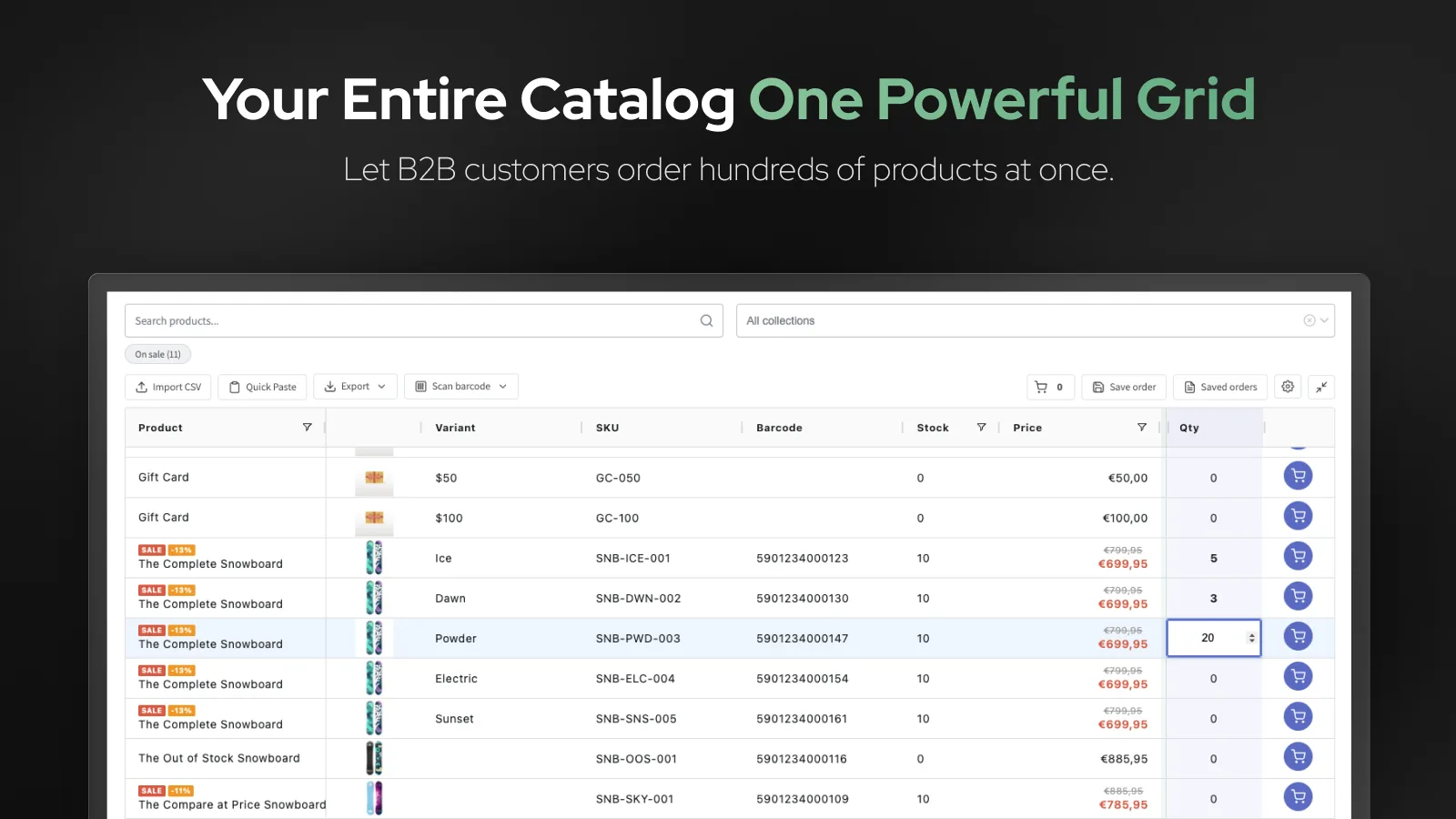
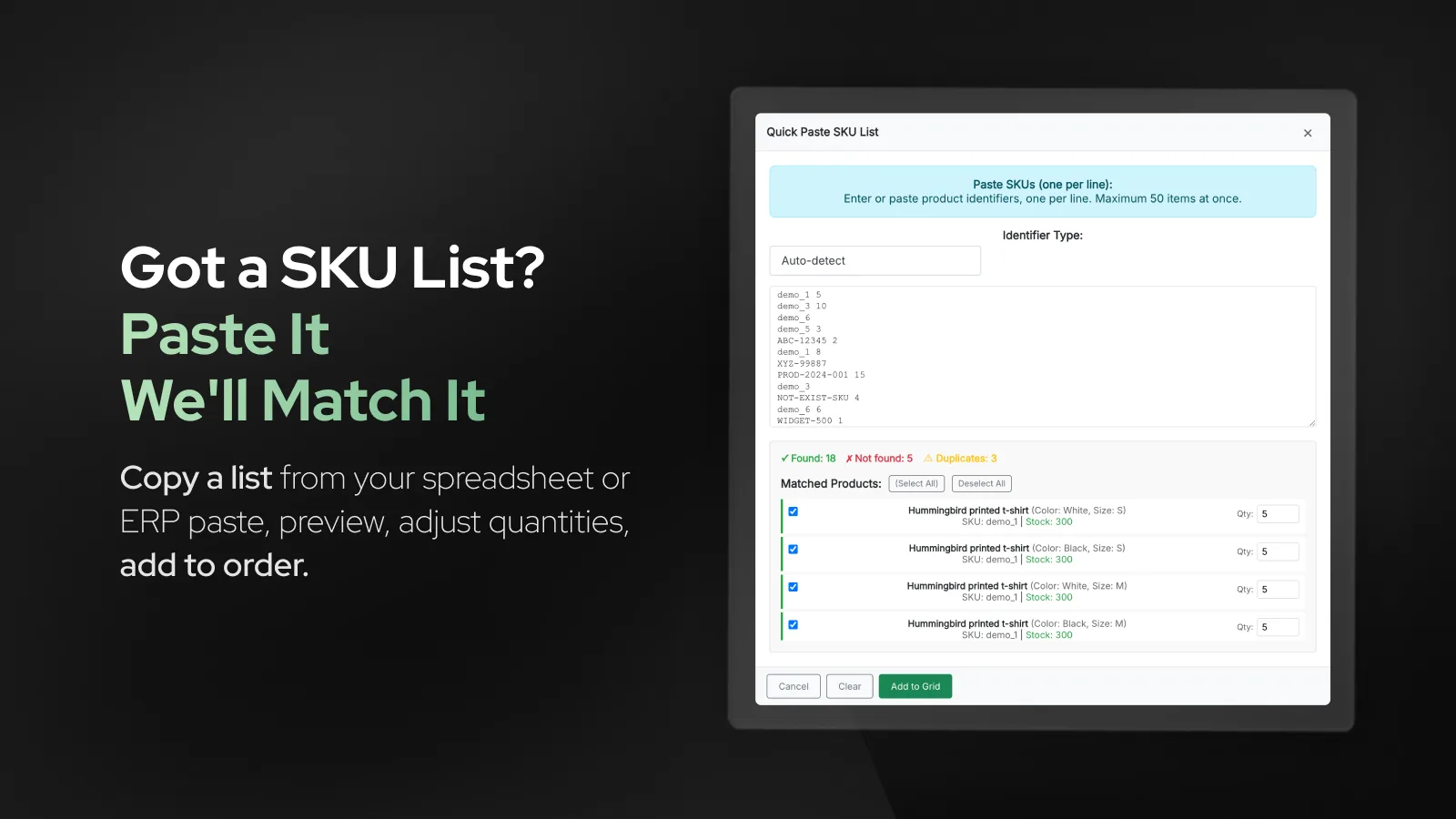
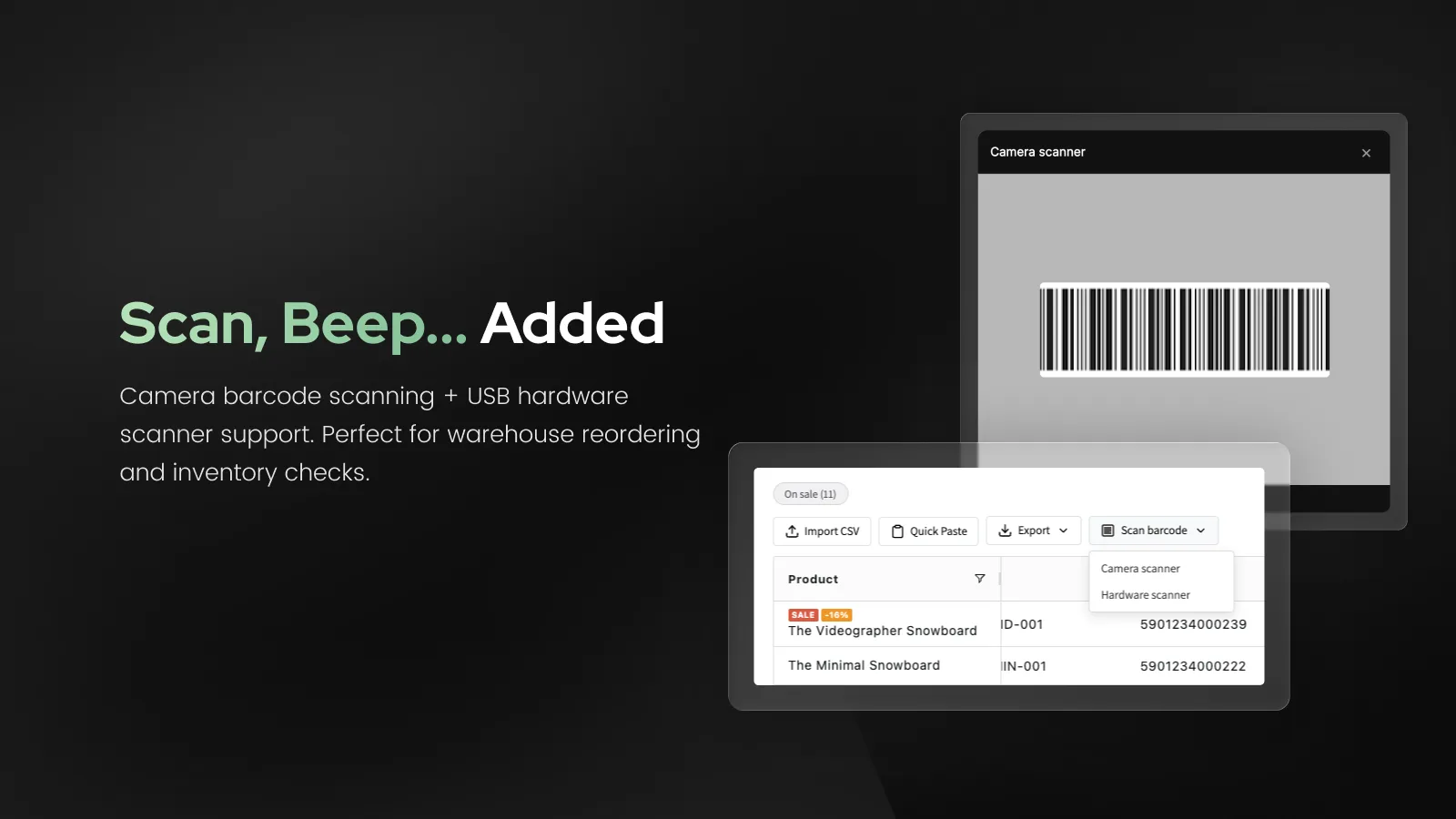
Five ways to fill an order. Type quantities in the grid. Paste a list of SKUs or barcodes with quantities and check the matches before they are applied. Import a CSV: the app detects the separator, lets you map the columns, and matches by SKU, then barcode, then product name. It even reads Shopify's own product export. Scan with a phone camera (EAN-13, EAN-8, UPC, Code 128), or use a USB scanner at the warehouse desk. Or open "My order" and add lines by typing a name, SKU or EAN.
Built for Shopify B2B. A logged-in company buyer sees their catalog prices, volume breaks and quantity rules (minimum, maximum and increment), in their currency, and only the products published to their catalog. Prices can be shown with and without VAT, with the tax worked out by Shopify, including mixed rates.
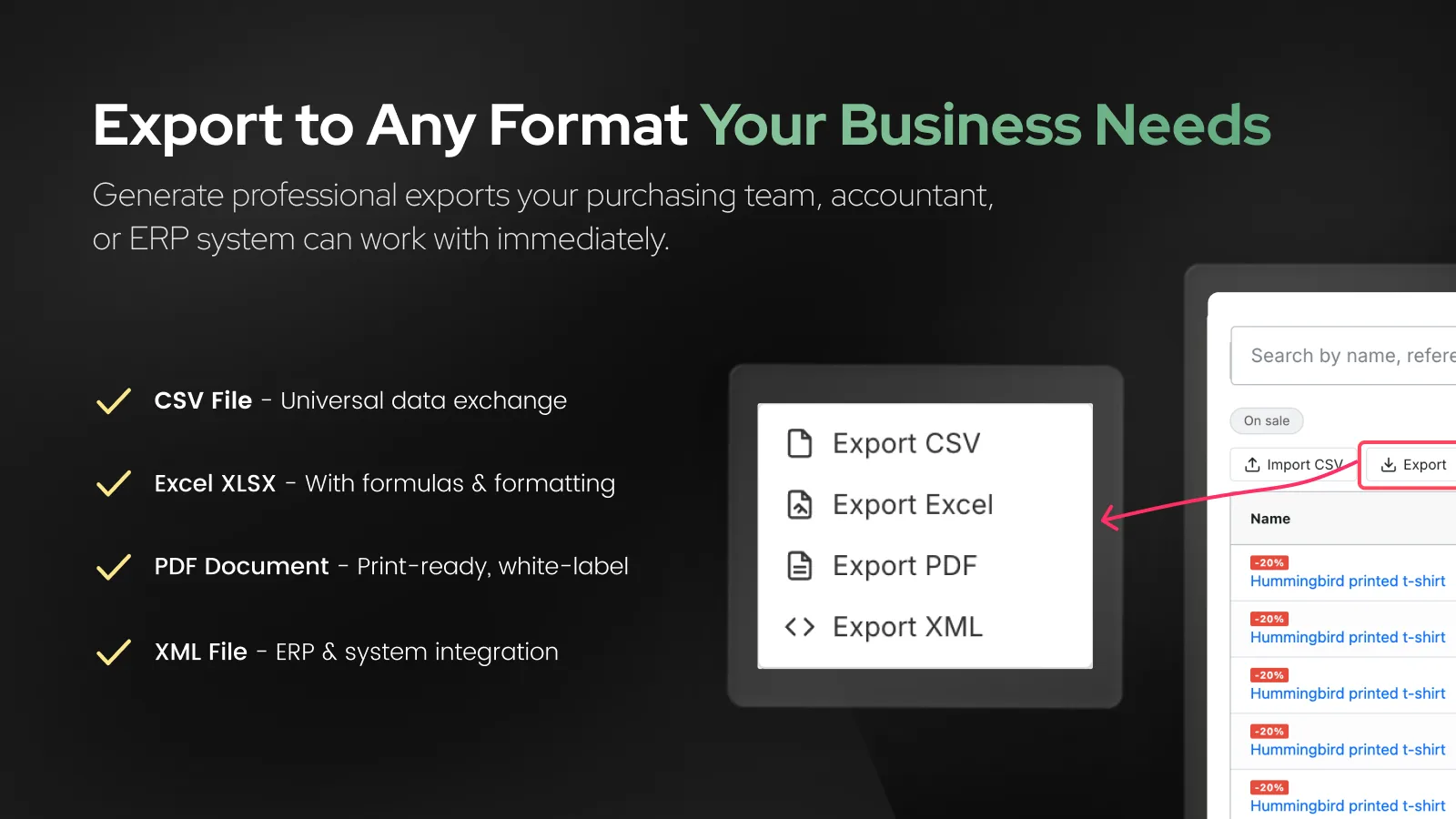
Orders that repeat and orders that need approval. Buyers save an order as a named list ("weekly restock") and load it again next time. The order in progress exports to Excel with formulas, PDF, CSV or XML, which helps when a purchasing department signs it off first.
Your catalogue, your columns. Add columns for product type, tags, collections or any product metafield, such as size, material or pack quantity. They can be sorted and are included in exports. Large catalogues are fine: up to 50,000 variants load straight into the grid. Colours and styling are set in the admin, the page runs through a theme app extension without editing theme code, and a menu link can be shown to everyone, logged-in customers or customers with a tag. The storefront is in English, German, French and Slovak.
- Price: $19.99 a month or $199.99 a year, 14-day free trial. One plan with every feature, so there is no tier to outgrow.
- Best for: wholesale and B2B stores whose buyers order many different products, restock from a shelf or warehouse, or bring their order as a list or a file.
- What it does not do yet: one-click reorder of a past order (Shopify's Buy again covers it), quotes, and reading PDF or photo purchase orders. There is no free plan, and as a 2026 app it has no reviews or Built for Shopify badge yet.
MultiVariants: best for size and colour tables on the product page
MultiVariants (by EFOLI) adds a variant table to any product page so buyers can order many sizes and colours of one product at once. It is the most reviewed app in this guide by a wide margin, with 363 reviews and a 5.0 rating, and it carries the Built for Shopify badge. It is strong on quantity rules: minimums, steps and case packs per variant, plus "mix and match" across variants.
- Price: free Starter plan up to 2,048 variants, then $12.99 or $29.99 a month.
- Good fit: fashion, apparel and any catalogue where one product has many variants.
- Less good fit: buyers who order across many different products, or who bring a SKU list. That is not what it is built for.
- From reviews: praise is almost entirely about support. A few reviewers mention that they need support to change layouts or column titles, and one 2025 review reports a conflict with a quick pay button that had to be switched off.
If you are looking for a MultiVariants alternative because your buyers order across many products, a catalogue grid such as ours fits better: it shows every variant as its own row and adds paste, upload and scanning. For a table on the product page itself, MultiVariants is hard to beat on price and track record.
WSH Order Form & ReOrder: the long-established one-page form
Wholesale Helper has been on the App Store since 2014. WSH gives you a single page order form, also available as app blocks for product pages, and it is Built for Shopify. It has 177 reviews: 171 five-star and 6 one-star, with nothing in between.
- Price: Basic $15.99, Professional $19.99 (adds CSV upload and minimum quantities), Enterprise $24.99 (adds one-click reorder). 25% off yearly.
- Free plan: the listing says "free forever", but it applies to development and trial stores. One 2024 review complains about exactly this.
- Languages: 29, the most in this guide.
- From reviews: very responsive support. The one-star reviews mention checkout and minimum quantity problems (2024) and the form failing under a traffic peak (2021).
Easy:Wholesale Bulk Order Form: simple, one plan, 54 five-star reviews
Easy:Wholesale (NexusMedia) is a bulk order form for the catalogue and for product pages, with one plan at $14.95 a month. All 54 reviews are five stars, and it is Built for Shopify. Its listing focuses on the order form itself and does not mention SKU paste, file upload or saved lists, so check those with the developer if you need them.
- Good fit: stores that want a clean order form and a single, predictable price.
- From reviews: time saved on large orders and quick support. A couple of older reviews mention fitting the form into the theme and image sizes.
BSS B2B Request a Quote, Order: quick order plus quotes
BSS Commerce makes several B2B apps. This one combines quick order pages with request for quote: a buyer can ask for a price, you answer, and the quote becomes a draft order. It has 193 reviews (4.9) and Built for Shopify.
- Price: Growth $19 (up to 5 quick order pages), Business $39 (unlimited pages, bulk import and reorder), Enterprise $79. So CSV upload and reorder start at $39.
- Good fit: wholesale where prices are negotiated per order.
- From reviews: helpful support in most reviews. Critical ones mention slow replies and no weekend support (2025, 2026), features held back for higher plans, and that mobile and tablet layouts had to be requested separately.
B2B Bulk Order / PO Upload: when buyers send you their purchase order
Formerly called Swift B2B Cart / CSV Upload, this app by Liquid Scratch is built for buyers who already have their order somewhere else. They can search by SKU or UPC, paste a list, or upload CSV, XLSX, and even a PDF, JPEG or PNG of a purchase order. It also has an admin side for draft orders and exports the catalogue and orders.
- Price: Essentials $19.90 (not available on Plus), Plus $39.90 (adds quantity rules, among other things).
- Reviews: 19, rating 4.9. The most repeated praise is that copy and paste works well and the app is not overloaded with features.
- Good fit: distributors whose customers email spreadsheets or PDFs.
Upro B2B & Wholesale: quick order inside a credit and wholesale suite
Upro (Monk Commerce) is a B2B app with credit limits, draft orders and a quick order form with SKU search and CSV or XLSX upload. It is Built for Shopify and has 23 reviews, all five stars. It has the longest trial here, 60 days.
- Price: depends on your Shopify plan. Quick order alone is $30 a month on Basic, $60 on Grow, $150 on Advanced and $299 on Plus. With credit features, $45 to $449.
- Good fit: stores that also want credit limits and a native B2B setup.
Orderbazi: the budget one-page form
SolverCircle's Orderbazi has been around since 2014 and costs $9.99 a month, with a 30-day trial. It shows products on one page with SKU display and filters. 14 reviews, all five stars. The free plan is for development stores only.
Extend B2B Quick Order: quick order tables for larger stores
Codup's Extend B2B builds quick order tables that can show metafields, supports CSV upload and works with Shopify B2B markets and catalogs. At $199 a month, or $1,499 a year, it is the most expensive dedicated quick order app here. 7 reviews, one of them a one-star from 2025 saying it did not work and support was limited.
B2B suites with an order form
If you need wholesale pricing, registration and payment terms as well, a suite may replace both your pricing app and your order form. On 10 October 2026: SparkLayer 4.9 (388 reviews, free plan up to 5 orders a month, then $49 to $299), Sami B2B Wholesale Pricing 4.9 (993), Clay 5.0 (286), BSS B2B Wholesale Pricing 4.9 (1,189). Their listings mention a quick order form, but in less detail than the dedicated apps above, so test the form itself in the trial.
What merchant reviews tend to say
The reviews of these apps are more useful than they look, if you read them the right way. A few patterns are worth knowing before you choose.
The ratings barely tell them apart. Almost everything is five stars. MultiVariants has 353 five-star reviews out of 363, Easy:Wholesale 54 out of 54. A 4.9 against a 5.0 means nothing. The number of reviews, how long the app has existed and what the few bad reviews say are far more useful.
Most five-star reviews are about support, not the product. Support or a named support agent comes up in most reviews of the leading apps. Many reviews are written within a day or two of installing. Good support matters, but it also means many reviewers had not used the app for long.
The complaints that keep coming back:
- Theme conflicts. Forms that clash with the theme, a slide-out cart or another app, and leftover code after uninstalling. It is the most common problem in the critical reviews.
- Customisation only through the developer. Several happy reviewers thank support for changing columns or the cart, which also means they could not do it themselves.
- Free plans that are not really free. Several reviews complain that the "free plan" turned out to be for development stores only, or that nothing worked during the trial.
- Price changes. Plans restructured so that a feature in use moved to a higher tier, or was switched off.
- Slower pages. A few apps are blamed for slower loading, including on pages without the order form.
- Support hours. Weekday-only support, or support that moved to an AI chatbot.
How to choose: a short checklist
- How do your buyers really order? Browse the catalogue, order many variants of one product, paste a list, upload a file, scan, or repeat last month's order? Pick the kind of app first.
- Try the native tools. If you are on a Horizon theme or a free theme from version 11, look at the quick order list and B2B catalogs before paying for an app.
- Test with your own catalogue. Use the trial with your real SKUs, your variants and your biggest customer's last order. A demo store with ten products tells you little.
- Check the plan you will actually need. CSV upload, reorder and minimums often sit in the second or third tier.
- Read the one-star reviews and the dates. Look for theme conflicts and support response times in the last 12 months.
- Ask who changes the layout. Can you edit columns, labels and placement yourself, or only through support?
- Check mobile. Open the form on a phone, especially if buyers order from the warehouse floor.
- Ask what happens on uninstall. Theme app extensions are removed with the app. Code pasted into the theme may not be.
- Look at languages and time zone. If your buyers are not English speaking, or support needs to answer during your working day, check before you commit.
How we put this guide together
We included apps from the Shopify App Store that let buyers add many products to the cart at once. Prices, ratings, review counts, Built for Shopify badges and launch dates come from the App Store listings on 10 October 2026. Features come from the listings. We did not install and test the other apps, so "not listed" means only that a listing does not mention a feature. We make Quick Order B2B Grid. The other apps were not installed and tested by us, so their entries describe what their listings say. If something here is wrong or out of date, tell us and we will correct it.
Prices and ratings change quickly, and new apps launch every few weeks. We will update this comparison every quarter.
Try before you buy
Every app here has a trial or a free plan, so the cheapest way to choose is to run your biggest customer's last order through two or three of them. Start with ours: try Quick Order B2B Grid free for 14 days, paste that order as a SKU list, scan a few products with your phone and export the result to Excel. The listing has a link to a demo store.
Frequently asked questions
Does Shopify have a built-in quick order form?
Yes, in a limited form. The quick order list shows all variants of one product in a table on the product page. It is included in Horizon themes since December 2025 and in Shopify's free themes from version 11.0.0. It does not put many different products on one page, and it has no SKU paste, file upload or barcode scanning.
Do I need Shopify Plus for B2B or a wholesale order form?
No. Since 2 April 2026, company profiles, B2B catalogs, payment terms and quantity rules are available on Basic, Grow and Advanced. Those plans can have up to 3 active B2B catalogs. Order form apps work on all plans, though some have plans that are not available on Plus.
What is the best free quick order app for Shopify?
For variant tables, MultiVariants has a free plan up to 2,048 variants and the longest track record. For a catalogue order form with SKU paste and CSV upload, the established apps are paid; most offer a 7 to 60 day trial instead. Be careful with "free forever" labels that apply only to development stores.
Can customers paste SKUs from Excel into a Shopify order form?
Yes, with an app. Quick Order B2B Grid and B2B Bulk Order / PO Upload both accept a pasted list of SKUs and quantities, according to their listings. Shopify itself does not.
Can buyers scan barcodes to order on Shopify?
Shopify has no barcode scanning on the storefront. Several apps let buyers search by a barcode or UPC number. Quick Order B2B Grid is the only app we found that scans with a phone camera as well as a USB scanner, so a buyer can walk the shelf with a phone and build the order.
What is a wholesale order form on Shopify?
It is one page where a wholesale buyer can order many products at once instead of adding them to the cart one by one. Shopify has no such page built in: its quick order list only covers the variants of one product. Wholesale order form apps add a page with the catalogue, quantity fields and often SKU paste, CSV upload or barcode scanning, and they work with Shopify B2B prices.
What is the best quick order app for Shopify B2B?
For catalogue-wide wholesale ordering we recommend Quick Order B2B Grid (we make it): it works with Shopify B2B catalog prices, volume breaks and quantity rules, and combines the catalogue grid, SKU paste, CSV import, barcode scanning, saved lists and export in one plan. If you need quotes, BSS is built for that. If you need reorder of past orders, WSH, or Shopify's own Buy again.
What is the difference between a quick order list and a bulk order form?
A quick order list usually means the variants of one product in a table on its product page. A bulk order form usually means one page with many products, often with search, paste or upload. Shopify's native feature is the first kind.
Will a quick order app slow down my store?
It can. A few reviews blame order form apps for slower pages, including pages without the form. Apps that run as a separate page or use theme app extensions add less to the rest of the store than apps that inject scripts everywhere. Test page speed before and after installing.
What does the Built for Shopify badge mean?
It is a badge Shopify gives apps that meet its requirements for performance, design and integration, and it makes an app more visible in the App Store. In this guide MultiVariants, WSH, Easy:Wholesale, BSS and Upro have it.
Can I show a wholesale order form only to B2B customers?
Yes. With Shopify B2B you can limit catalogs and prices to companies, and most order form apps can restrict the page to logged-in customers or customer tags. Check how each app handles customers who are not logged in.
Is there a MultiVariants alternative?
It depends on what you need. If buyers order across many products, Quick Order B2B Grid shows every variant of every product as a row and adds SKU paste, CSV import and scanning. For a table on the product page only, Shopify's own quick order list may be enough.