 Shopify
How to show prices with and without VAT on Shopify (B2B dual pricing)
Shopify shows one price, but B2B buyers need net and consumers need gross. What Shopify's own tax settings can and cannot do, and how to show prices excluding and including VAT together where B2B buyers order.
Shopify shows each shopper one price: either excluding VAT or including VAT, never both side by side. Consumers need the price with VAT. Many business buyers work with the price without VAT because they can reclaim it. If you sell to both, one group has to do the conversion in their head.
Your options in short:
| Option | What the shopper sees | Good to know |
|---|---|---|
| Shopify tax settings | One price, with or without VAT, also per market | Built in. Never both prices at once. |
| Theme code | Two prices on product pages | Usually a fixed VAT rate, which is wrong for other countries, reduced rates and some variants. |
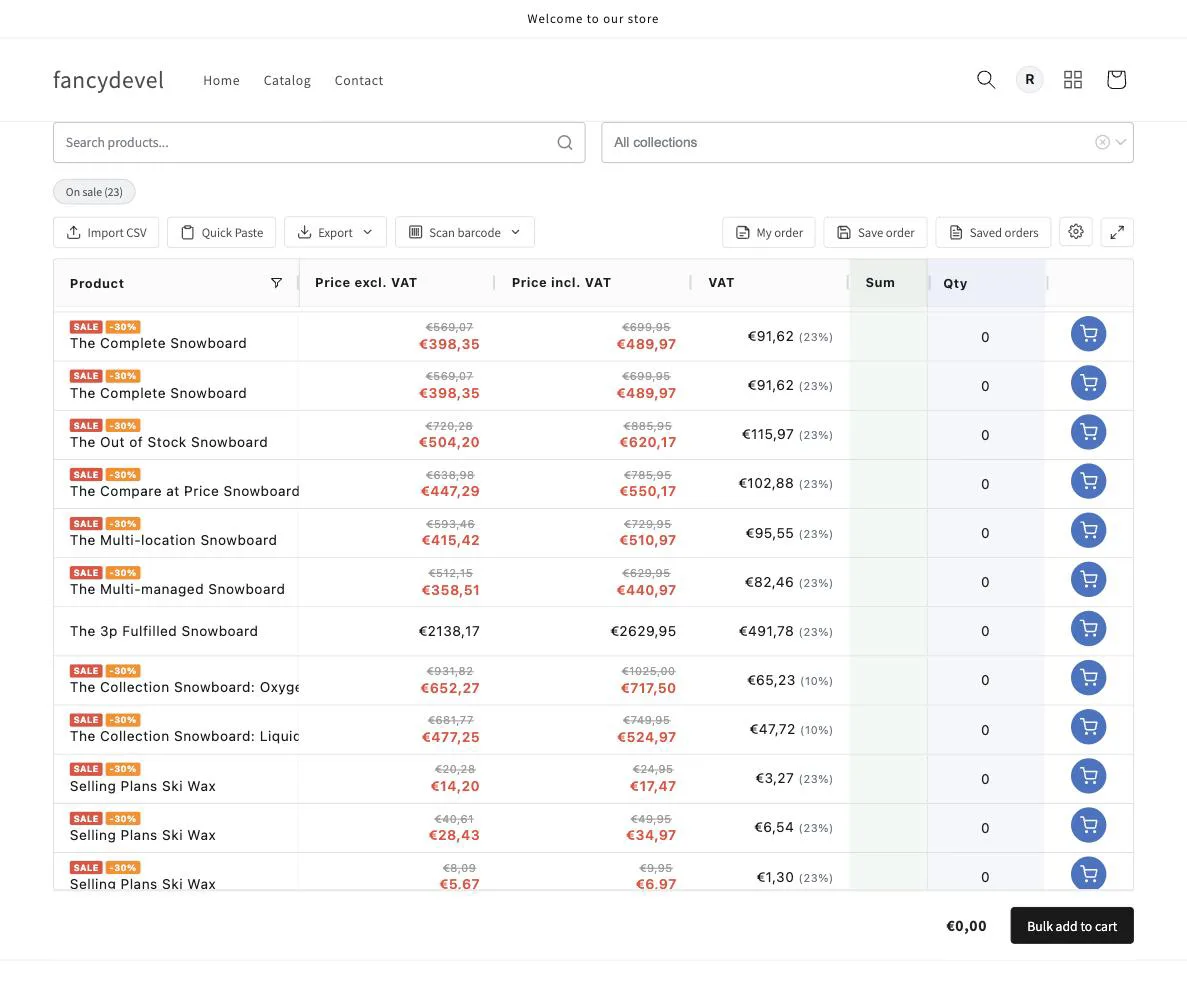
| Quick Order B2B Grid | Price excl. VAT, price incl. VAT and VAT for logged-in B2B company buyers | Only on the quick order page, not on product or collection pages. |
The rest of this guide explains what the rules say, what each Shopify setting does, how a VAT toggle differs from showing both prices, and how dual prices work in the B2B order grid.
What dual price display means
Dual price display means showing two figures for the same product together, say €100 excluding VAT next to €120 including it. The same two numbers go by several names:
- Net, ex VAT, tax-exclusive, excl. VAT: the price before VAT.
- Gross, inc VAT, tax-inclusive, incl. VAT: the final price with VAT included.
- VAT amount: the tax portion itself, the difference between the two.
Note that "dual pricing" sometimes refers to showing a cash price versus a card price (a US payment-surcharge idea). That is unrelated to VAT. In this article, dual price display always means net and gross shown together.
What the rules say
For European and UK stores, how you show VAT is partly a legal question. The rules differ by audience and country, so treat this as orientation, not legal advice.
- Consumers in the EU must see the price including VAT. The Price Indication Directive (98/6/EC) defines the selling price for consumers as the final price including VAT and all other taxes. It covers products offered to consumers, not prices between businesses.
- In the UK, VAT-exclusive prices are likely acceptable only for an audience made up entirely of businesses. ASA guidance says it should then be clear that the price excludes VAT and who the price applies to.
- For a mixed UK audience, give the VAT-inclusive price. If you also show a VAT-exclusive price, the same guidance says the VAT-inclusive price should be at least as prominent, and the VAT-exclusive price should come with a clear statement of the VAT rate or amount.
There is also a practical side. A business buyer who sees only gross prices has to work out the net cost on every line, and a consumer who sees only net prices gets a higher total at checkout than expected.
Selling across borders adds another problem: VAT rates differ by country (roughly 17 to 27 percent across the EU), and often by product within one country, so a correct gross figure is not a single fixed number.
How Shopify handles VAT natively
Shopify shows one price per shopper, either excluding or including tax. Here is what each native setting does.
Default: prices shown excluding VAT
Out of the box, Shopify displays product prices without sales tax or VAT and adds the tax at checkout. (Shopify Help)
Show prices including VAT
To show tax-inclusive prices, go to Settings > Taxes and duties and select "Include sales tax in product price and shipping rate", then save. Keep "Charge tax on this product" ticked on each product. (Shopify Help)
Important: this setting does not add VAT on top of your prices. The price you entered becomes the price the customer pays, and Shopify shows the tax as the part already included in it. If your prices were entered without VAT, raise them before you switch, or the VAT will come out of your margin.
Two more details from Shopify's help. Your home tax rate comes from your store address, and it is deducted from tax-inclusive prices when you sell to another tax-inclusive country. And with tax-inclusive pricing you cannot show a tax-exempt price to certain customers: a customer set as tax exempt is still charged the full listed price.
Include or exclude VAT by market
You set tax inclusion for each market you sell to. Customers in a market such as the UK can see prices including local VAT, while customers in the US see prices with tax added at checkout. This is more flexible, but it is still one price per shopper.
VAT for B2B companies
Native B2B is no longer limited to Shopify Plus. Since 2 April 2026, Basic, Grow and Advanced include company profiles, payment terms, volume pricing and up to three B2B catalogs assigned through Markets. Unlimited catalogs and assigning catalogs directly to companies and locations remain on Plus.
Tax is set per company location under Customers > Companies, then the company, the location and Manage tax settings: Collect tax, Don't collect tax, or Collect tax unless exemptions apply. Each location can also hold a tax ID; with Shopify Tax, UK and EU locations show it as a VAT number, which Shopify validates. (Shopify Help)
This decides the tax each business is charged. It does not change what the buyer sees: still one price, not net and gross together.
Can Shopify add an inc/ex VAT toggle?
Shopify has no built-in switch that lets a shopper flip between prices including and excluding VAT. A toggle is also different from showing both prices: the buyer sees one view at a time and has to remember which one is on. For a consumer looking at a few products that can work. A business buyer building a 40-line order is better served by seeing both numbers on every line.
The theme code route and its limits
Developers often add dual display in the theme: multiply or divide the price by a fixed number (for example 1.2 for 20 percent VAT) and print both, sometimes only for customers with a "wholesale" tag. It works in a demo, but it has limits in real use:
- A fixed rate is wrong for other countries (19, 21, 23, 27 percent) and for reduced-rate products.
- The theme computes tax on its own instead of using Shopify's calculation, so rounding can differ from the checkout total.
- Variant pickers, quantity breaks, multi-currency, Markets and B2B catalogs change the price after the page loads, and a theme snippet rarely follows all of them on product, collection, search and cart pages.
For a small store in one country this can be enough. For a B2B catalog it means regular fixes.
Dual pricing in the B2B order grid
B2B buyers often order from a list: dozens of SKUs, quantities, a running total. Quick Order B2B Grid turns your catalog into that kind of ordering screen, and it can show net and gross prices there. It works with the native setup described above: you keep your Shopify tax settings, B2B companies and catalogs.
One catalog, two buyers
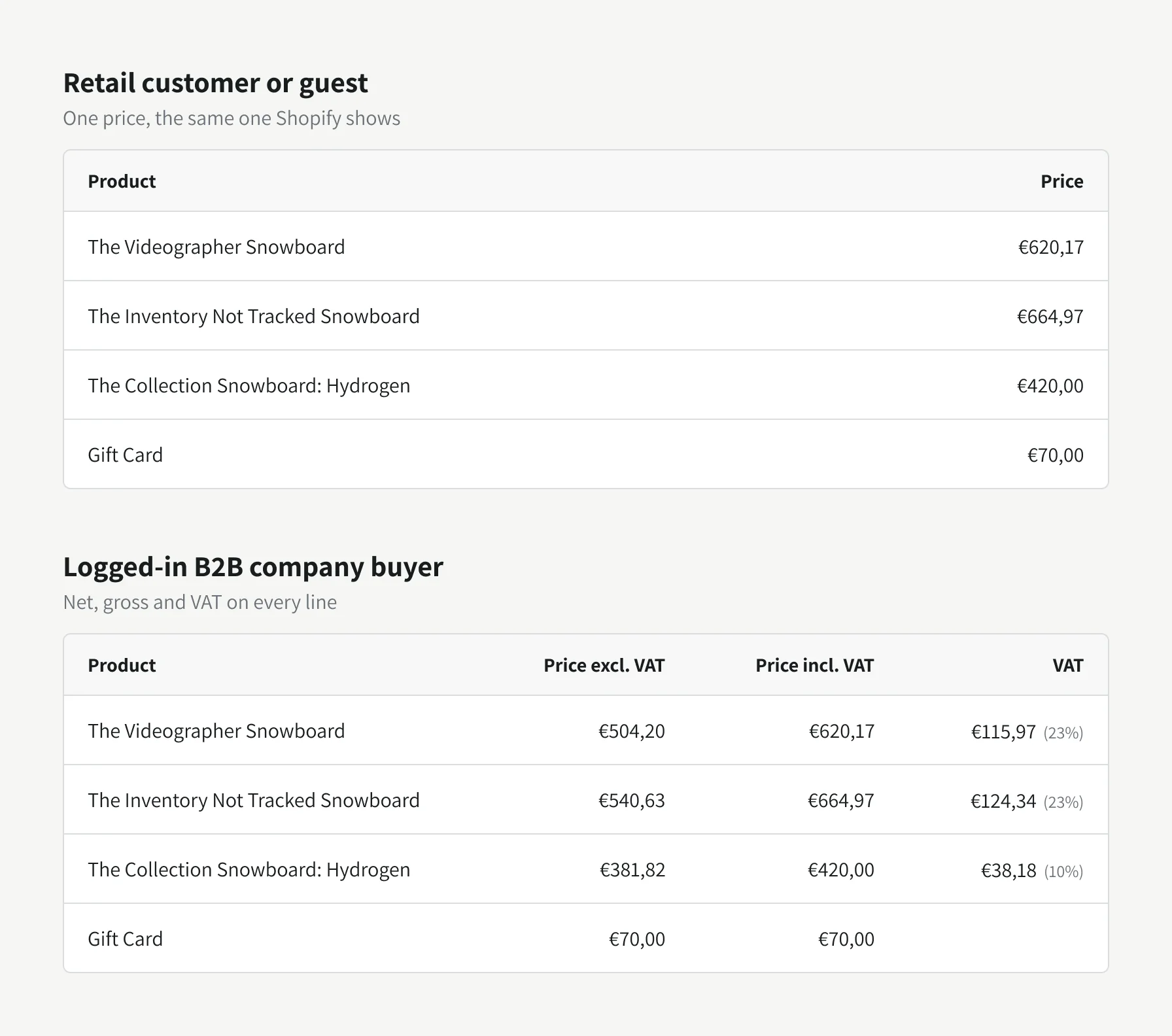
Retail customers and guests see a single price, the same one Shopify shows them. A logged-in buyer who belongs to a B2B company sees three columns: Price excl. VAT, Price incl. VAT and VAT with its rate. Non-taxable items such as gift cards show the same amount in both columns.
Setup: no tax rate table
In the app, open the display settings and switch on "Show net + gross (incl. VAT) prices", then grant access once. You do not enter any VAT rates. The grid asks Shopify to calculate tax for the buyer's company location with a calculation that does not create an order.
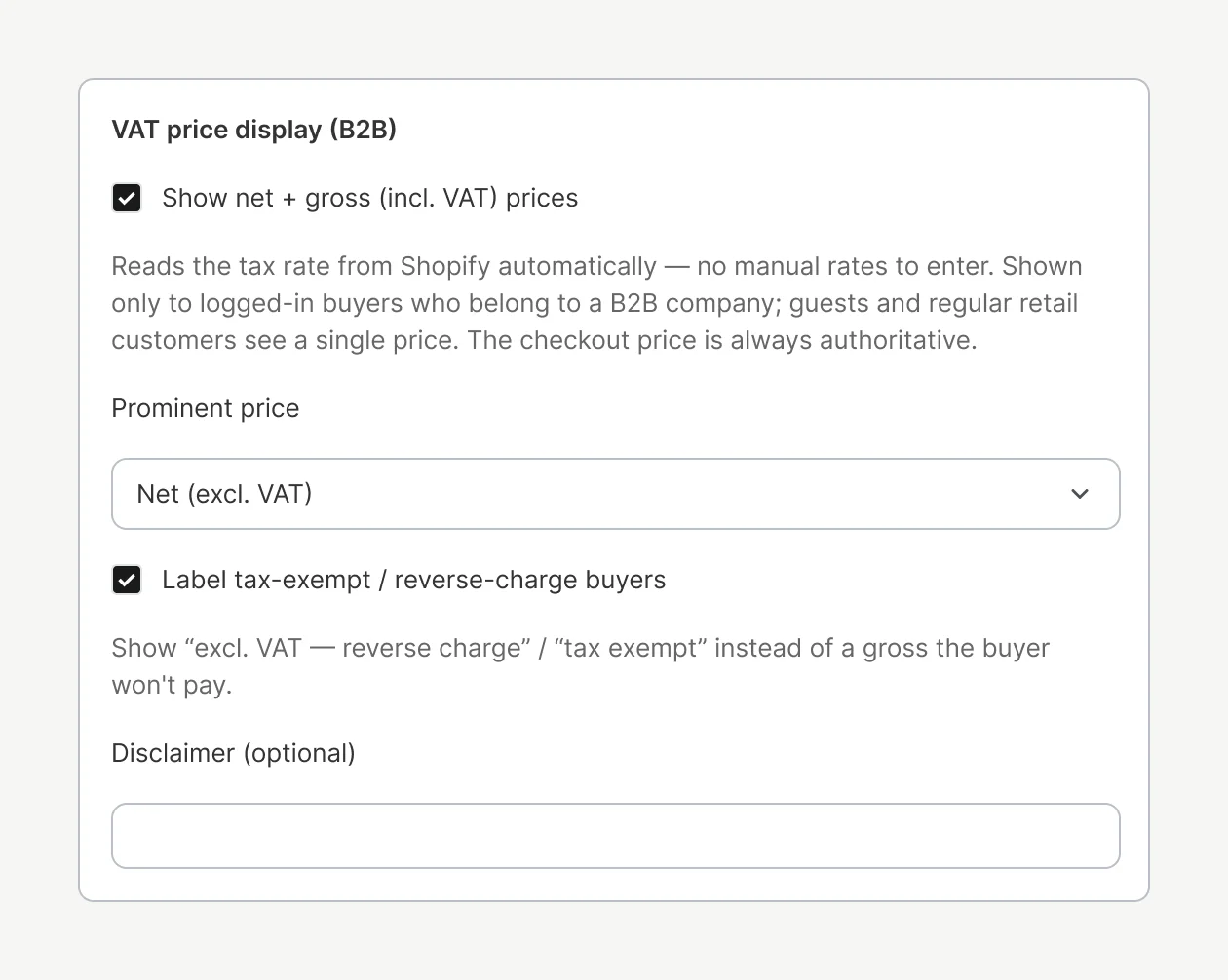
- Prominent price. Choose which figure leads: automatic (follows your store's tax setting), net or gross.
- Tax-exempt and reverse-charge buyers. If a company location is tax-exempt, or a cross-border sale falls under reverse charge, the grid shows a "tax exempt" or "reverse charge" label instead of a gross price. Zero-rated products are labelled too.
- Optional disclaimer next to the totals, in your own words.
What to check after setup
- Rates per product group. The grid looks up the rate for groups of products that share the same collections. If a collection mixes products with different tax rates (for example a reduced-rate item among standard-rate items), check those rows after setup.
- Large catalogs. The number of rate lookups per page load is limited. Rows the grid could not check, and buyers whose tax details are not available, see a single price instead of a guessed one.
- Logged-in B2B buyers only. Dual prices appear only for logged-in buyers who belong to a B2B company. Everyone else sees the normal single price.
Totals
As the buyer enters quantities, the footer shows the total excluding VAT and the total including VAT side by side, with the VAT amount. The totals cover the selected products with B2B catalog prices, quantity breaks and calculated tax. Shipping, discount codes and automatic discounts are applied at checkout, so the final amount can differ. Shopify checkout determines the final charge.
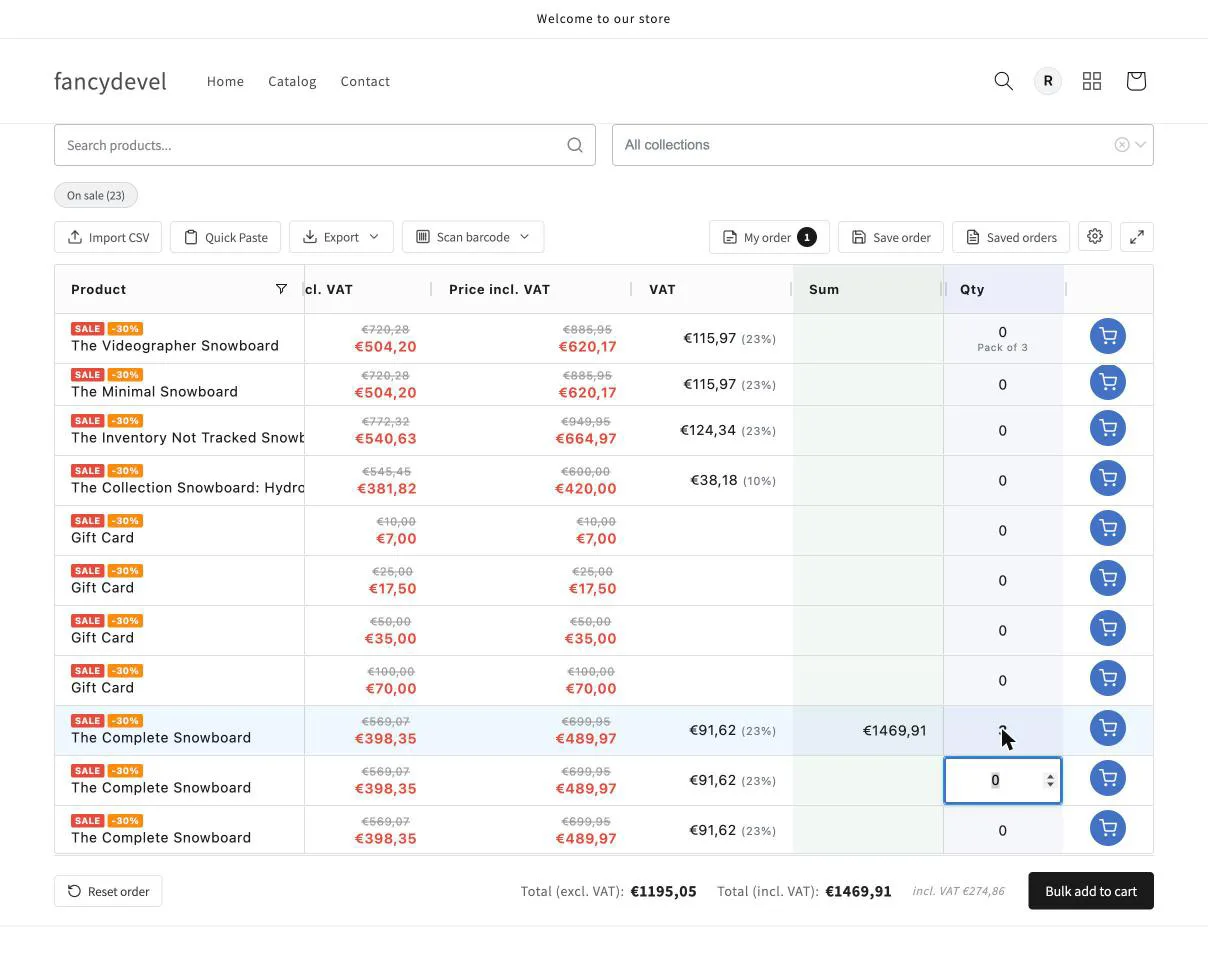
The dual prices appear on the quick order page, in the ordering grid, not on individual product or collection pages. If you need both prices on product pages as well, that needs a separate solution.
Frequently asked questions
Can Shopify show a price with and without VAT?
Not both at once. Shopify shows one price per shopper: excluding tax by default, including tax when you turn on tax-inclusive pricing, or either one per market. Showing net and gross together needs theme code or an app such as Quick Order B2B Grid, which shows both on its B2B ordering page.
Does Shopify include VAT in prices by default?
No. By default Shopify shows prices without VAT and adds it at checkout. To show prices including VAT, go to Settings > Taxes and duties and select "Include sales tax in product price and shipping rate".
Can I add an inc/ex VAT toggle to Shopify?
Not natively; there is no built-in switch for shoppers. A toggle also shows only one price at a time. For B2B ordering, showing price excluding VAT, price including VAT and the VAT amount on every line avoids comparing a net price with a gross total.
How does Shopify handle VAT for B2B companies?
Each company location has its own tax settings: Collect tax, Don't collect tax, or Collect tax unless exemptions apply, plus a tax ID that Shopify Tax shows and validates as a VAT number for UK and EU locations. This controls the tax charged; the buyer still sees one price.
Do I need Shopify Plus for B2B pricing?
No longer. Since 2 April 2026, Basic, Grow and Advanced include company profiles, payment terms, volume pricing and up to three B2B catalogs. Unlimited catalogs and assigning catalogs directly to companies remain on Plus. Native B2B still shows one price per buyer.
What is the difference between net and gross price?
Net is the price before VAT, what businesses budget in and reclaim. Gross is the final price with VAT included, what consumers pay.
Is it legal to show prices without VAT?
Consumers in the EU must be shown the price including VAT. In the UK, VAT-exclusive prices are likely acceptable for an audience made up only of businesses if it is clear who the price applies to. For a mixed audience, show the VAT-inclusive price and give it at least equal prominence to any VAT-exclusive price.
Related guides
Best Wholesale Order Form and Quick Order Apps for Shopify (2026)
Shopify now has a free quick order list and B2B on every plan, so the first question is whether you need an app at all. If you do, here are 9 of them compared in detail on what they actually let buyers do, what they cost and what their reviews complain about.
Read guide GuideHow to speed up wholesale ordering on your store (5 proven methods)
B2B buyers reorder, they don't browse. Five proven methods to speed up wholesale ordering, a one-page order grid, CSV & SKU import, barcode scanning, saved templates and account pricing, with a before/after and FAQ.
Read guide GuideB2B ordering best practices for e-commerce stores in 2026
What wholesale buyers expect from online ordering in 2026 and the B2B ordering best practices that deliver it: one-page bulk ordering, self-service reorder, account catalogs and pricing, accurate live stock.
Read guide