 Magento 2 extension
A quick order extension for Magento 2 that goes beyond the SKU form
Quick Order B2B Grid adds an ordering page to your Magento store. Wholesale buyers search the catalog, paste SKUs, import a CSV or scan barcodes into one grid, see tier prices and totals with and without tax, and add the whole order to the cart at once.
$199 one-time · Magento Open Source and Adobe Commerce 2.4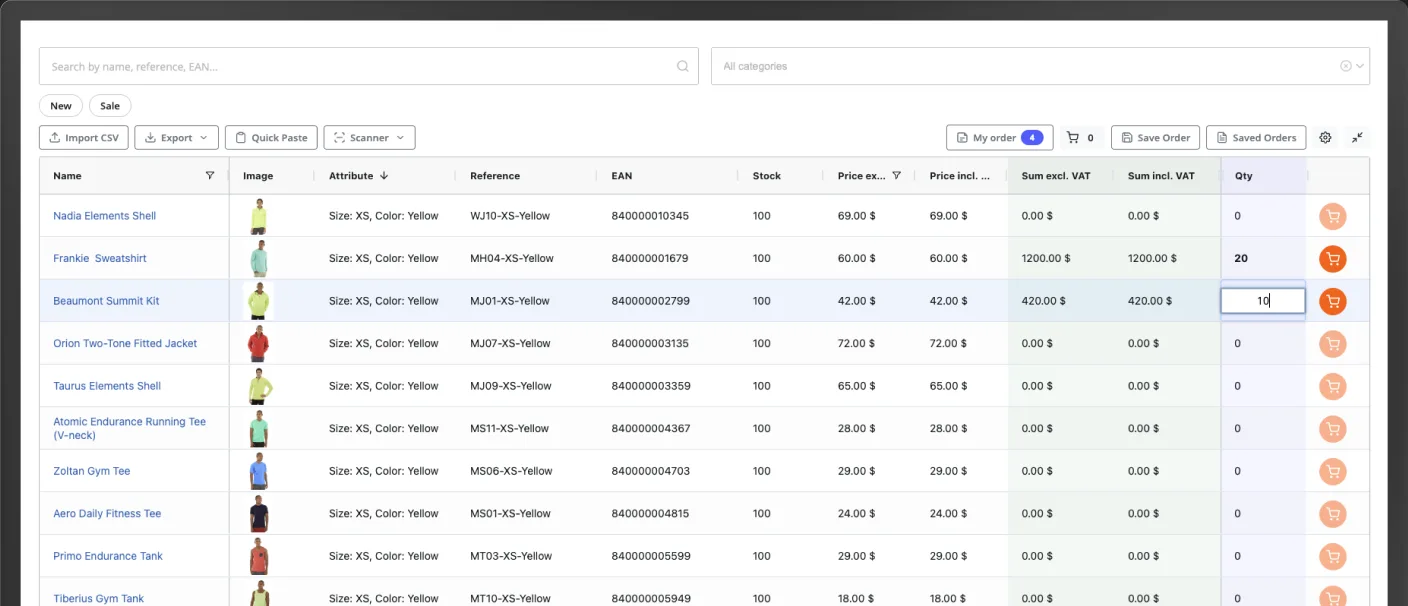
Magento Open Source has no quick order. Adobe Commerce has a SKU form
Adobe Commerce B2B adds Quick Order, a form for buyers who already know their SKUs. Magento Open Source has nothing like it. A wholesale buyer who wants to browse, check prices and fill a large order needs the whole catalog in one place.
Magento native Quick Order
- Magento Open Source: no quick order form
- Adobe Commerce: part of the B2B features, switched on in the admin
- Buyers type SKUs or product names, paste a SKU list or upload a file
- No catalog browsing, buyers must know what they want
Quick Order B2B Grid
- Works on Magento Open Source and Adobe Commerce
- Your whole catalog in one grid, with search and a category tree
- Search, paste, import a CSV or scan barcodes
- Stock, tier prices and totals with and without tax in every row
Four ways to fill a wholesale order
Wholesale buyers rarely browse. They come with last week's order, a spreadsheet or a shelf to restock, and the grid takes all of them.
Search
Search names, SKUs, EAN codes and MPN numbers, with or without accents. A category tree and New and Sale filters are built in.
Quick Paste
Paste SKU and quantity pairs from Excel, Google Sheets or any text. Tab, semicolon, comma and space separated lists all work.
CSV import
Upload a CSV or text file. The delimiter is detected, columns are mapped by SKU, EAN, MPN or product name and the matches are shown before anything is applied.
Barcode scanning
Scan with the camera in Chrome, Edge, Firefox or Safari, or with a hardware scanner. Codes are matched against EAN and the quantity is added.
Reorder: load a past order into the grid
A signed-in customer opens Reorder, picks one of their past orders and loads it into the grid. They change a few quantities and send it to the cart.
The rows use today's prices, stock and tier prices, not what was paid back then. Lines that can no longer be ordered, such as a variant that no longer exists, are reported instead of quietly disappearing.
Reorder follows your store settings. It appears only when Magento's own Allow Reorder option is on.
Real B2B pricing in every row
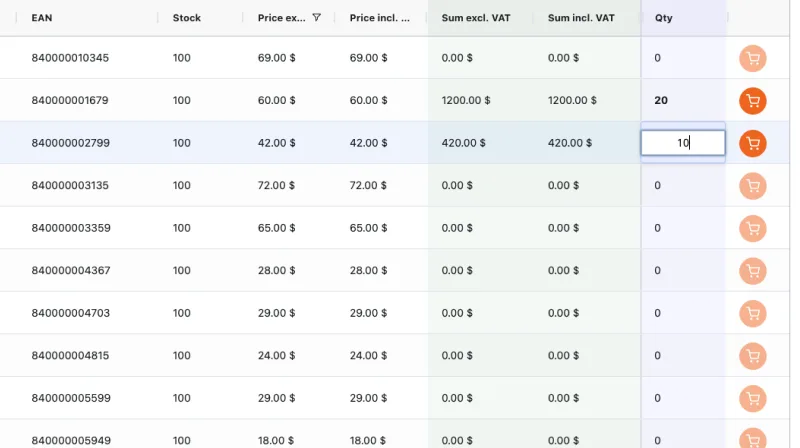
Tier prices show their quantity breaks in the grid, so a buyer sees when a few more units get a better price.
Every row has a price excluding and including tax, with line totals for both. The subtotal updates as quantities change and follows your store's tax rules and locale. Fixed Product Tax (FPT/WEEE) works in all four display modes.
Quantity rules come from your catalog: decimal quantities, quantity increments and minimum and maximum sale quantities are respected.
From the first order to the quote request
Saved order templates
Logged-in customers save an order under a name and load it next time. You can let guests save orders too, and see customers' saved orders in the admin.
Bulk add to cart
One button sends every row with a quantity to the cart. Stock is checked, and notifications say what was added and what was not.
Back-in-stock alerts
Buyers subscribe to a stock alert straight from an out-of-stock row. It appears when Magento's stock alerts are switched on.
Request a Quote
On Adobe Commerce B2B the extension fills the cart and opens the quote request. The quote itself is created and negotiated by Adobe Commerce B2B.
Configurable and grouped
Every variant of a configurable product and every child of a grouped product is its own row, with its own stock and price.
Export the order
Download the current grid with quantities as CSV, Excel, PDF or XML. Active filters and search are respected.
You decide who orders and what they see
All settings are under Stores > Configuration > General > Quick Order, with a quick start guide on the first screen.
Access control
Open the page to all visitors, to logged-in customers only, or to selected customer groups.
Column configurator
Choose which of the 14 columns buyers see, their order and pinning, and which can be sorted or filtered.
Large catalogs
Automatic, client-side or server-side loading. Above a product count you set (default 10,000), products load from the server as the buyer scrolls.
Styling
Set colors, border radius, font size and spacing with a live preview, so the grid matches your store.
SEO fields
Meta title, description, keywords and robots for the Quick Order page.
Comfort for buyers
Image preview on hover, fullscreen mode, and a column layout remembered per store view.
Will it work with my store?
- Magento versions
- Magento Open Source 2.4 and Adobe Commerce 2.4, cloud and on-prem. PHP 8.1 or newer.
- Themes
- Luma, Blank and Hyvä. No jQuery on the storefront, and it runs under a strict Content Security Policy.
- Your data
- Reads the native catalog, inventory, price and tax index tables. No data sync, no migration and no core file modifications.
- Installation
- A Composer package from the Adobe Commerce Marketplace repository. No third-party account or API key.
- Languages
- 14 included: English, Czech, Dutch, French, German, Hungarian, Italian, Polish, Portuguese, Romanian, Russian, Slovak, Spanish and Turkish.
- Links for buyers
- A Quick Order link in the navigation and in My Account, hidden for visitors without access.
- Adobe Quality Report
- Installation and Varnish tests, coding standard, plagiarism, malware, marketing review and manual testing: all Passed.
- Devices
- Responsive layout for desktop, tablet and mobile.
What it does not do
- No ordering by staff on behalf of a customer.
- Company accounts, shared catalogs, customer price lists and quotes stay with Adobe Commerce B2B or the extensions you already use.
- PDF export uses Latin characters: Western European accents are kept, Central European and Cyrillic characters are transliterated.
Live on your Magento store in three steps
A standard Composer install. The order page then runs at /quickorder.
Buy
Buy Quick Order B2B Grid on the Adobe Commerce Marketplace. $199 one-time, every feature included.
Install
Run composer require fancystudio/module-quickordergrid, then bin/magento module:enable FancyStudio_QuickOrderGrid and bin/magento setup:upgrade. In production mode, also compile and deploy static content as the installation guide shows.
Configure
Under Stores > Configuration > General > Quick Order, choose who can open the page, which columns show and where the link appears.
Step-by-step guide, including Adobe Commerce cloud: Magento installation
Questions about the Magento quick order extension
Adobe Commerce B2B includes a Quick Order form. Buyers enter SKUs or product names, paste a list of SKUs or upload a file, and the items go to a list before the cart. It does not let them browse the catalog. Quick Order B2B Grid shows the whole catalog in one grid with stock, tier prices and totals, adds barcode scanning, saved orders and reorder, and can hand the order to the Adobe Commerce B2B quote request. Magento Open Source has no quick order form at all.
Yes. The grid works on Hyvä as well as on Luma and Blank. It uses no jQuery on the storefront and runs under a strict Content Security Policy.
Yes. Each variant of a configurable product is its own row, for example Size: M, Color: Blue, with its own stock and price. Each child product of a grouped product is its own row too.
Yes. A signed-in customer opens Reorder, picks one of their past orders and loads it into the grid. The rows use today's prices, stock and tier prices, and lines that can no longer be ordered are reported. Reorder appears when Magento's own Allow Reorder setting is on.
Yes. The grid has a price excluding tax and a price including tax for every row, line totals for both and a subtotal that updates as quantities change. It follows your store's tax rules and supports Fixed Product Tax (FPT/WEEE) in all four display modes.
Buy it on the Adobe Commerce Marketplace, then install it with Composer from repo.magento.com using your Marketplace access keys: composer require fancystudio/module-quickordergrid, then bin/magento module:enable FancyStudio_QuickOrderGrid and bin/magento setup:upgrade (in production mode, also compile and deploy static content). On Adobe Commerce cloud you commit composer.json and composer.lock and push. The installation guide has every step.
Magento guides
Install Quick Order B2B Grid on Magento
Composer install for Magento Open Source, Adobe Commerce on-prem and Adobe Commerce cloud.
Read guideAdmin configuration
Access rules, link placement and the loading mode for large catalogs.
Read guideCSV import, Quick Paste and export
How buyers bring in a list of products and download the order in four formats.
Read guideBarcode scanner
Scanning with the device camera and with a hardware scanner.
Read guideGive your Magento B2B buyers a faster way to order
$199 one-time on the Adobe Commerce Marketplace. Every feature included, no additional fees and no external account.