 PrestaShop module
A quick order module for PrestaShop that puts your whole catalog on one page
Quick Order B2B Grid adds an ordering page to your PrestaShop store. B2B buyers find products by name, reference or EAN, paste a list, import a CSV or scan barcodes, see the price their quantity earns and add the whole order to the cart at once.
€83.99 one-time (excl. tax) · first year of support and updates included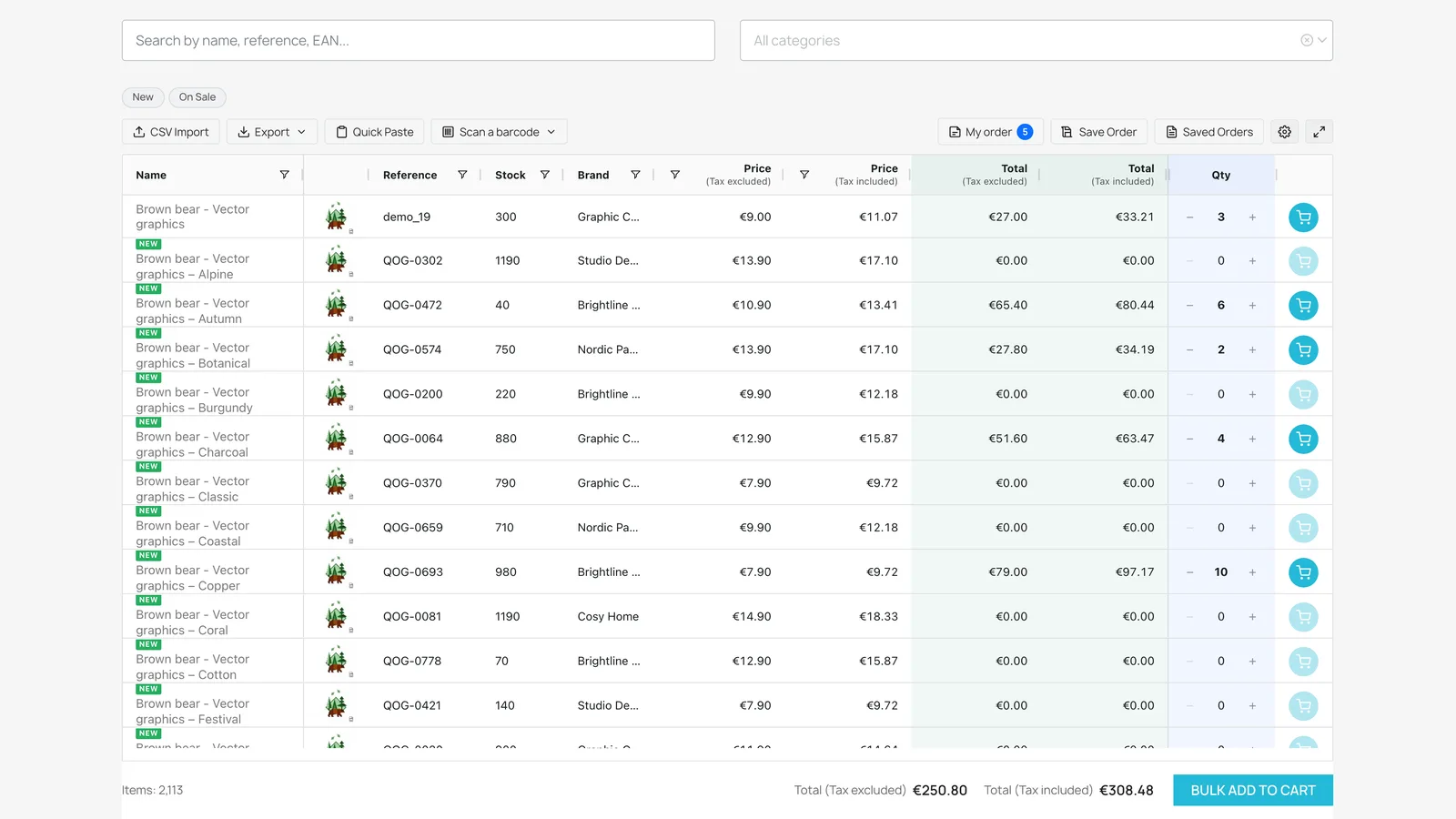
PrestaShop is built for browsing. Wholesale buyers come with a list
A standard PrestaShop store sends buyers through categories and product pages, one product and one combination at a time. That is fine for a few items. A buyer reordering 40 references needs them all in one place.
PrestaShop without the module
- Category page, then product page, for every item
- Pick the size or colour on each product page
- Add to cart one product at a time
- No way to upload an order from a spreadsheet
Quick Order B2B Grid
- One Quick order page, linked from the top bar and My account
- Every product and every combination as a row
- Search, paste, import or scan, then add everything at once
- Totals with and without tax before the cart
Four ways to fill a wholesale order
Buyers start from whatever they already have: a reference list in an email, a CSV from their own system, a barcode on the shelf, or just a product name.
Search
Type a product name, reference or EAN and the grid filters as you type. Category tree, New and On sale filters and column filters are built in.
Quick Paste
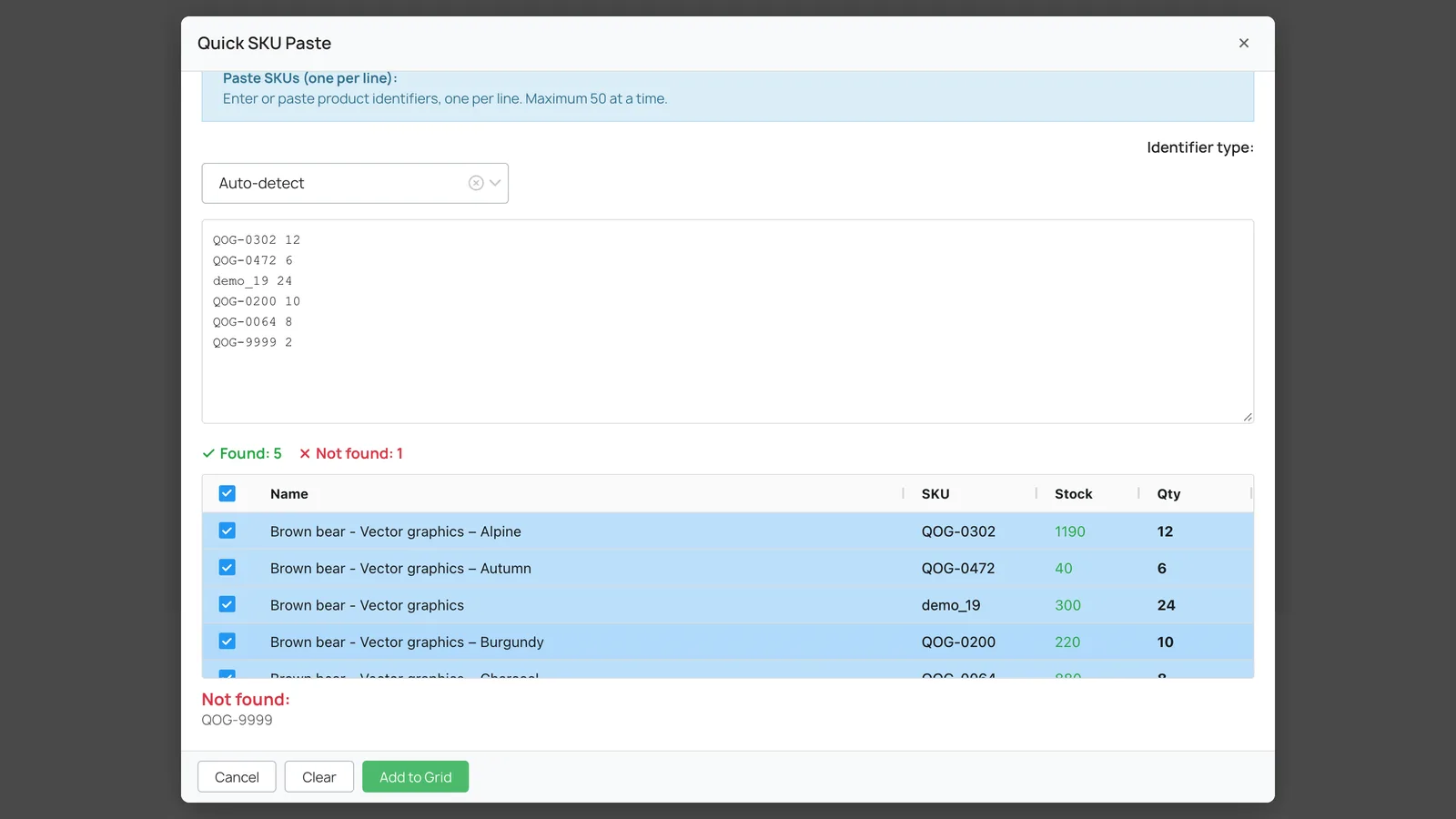
Paste up to 50 references or barcodes with quantities, one per line. Check what was found and not found, then add it to the grid.
CSV import
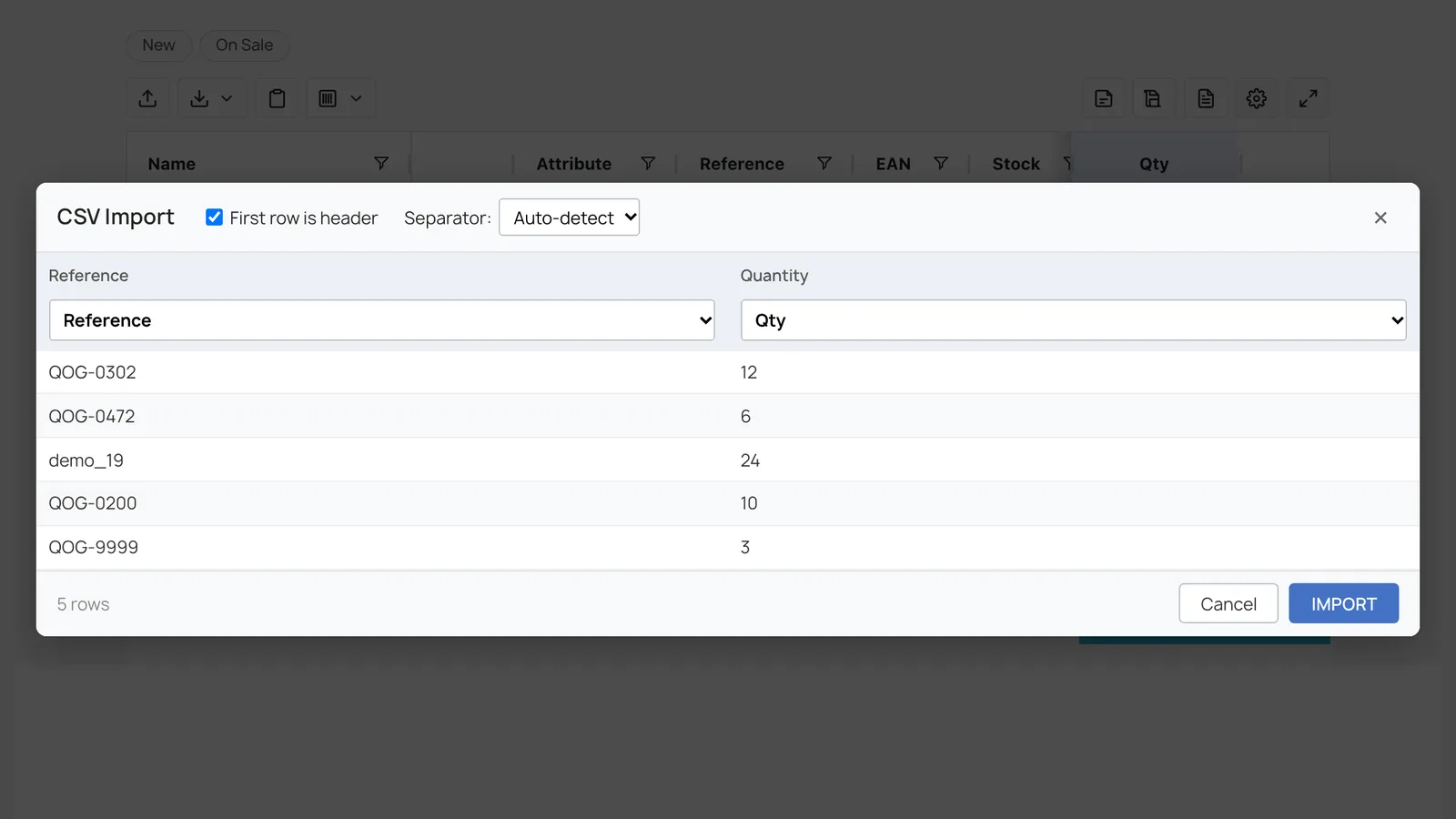
Upload a CSV of up to 5,000 rows. The separator is detected and columns are mapped from their headers, then the rows are matched on the server.
Barcode scanning
Scan with a phone or laptop camera (EAN-13, EAN-8, UPC-A, Code-128) or any USB scanner. Each scan adds one to the quantity.
Every combination is a row
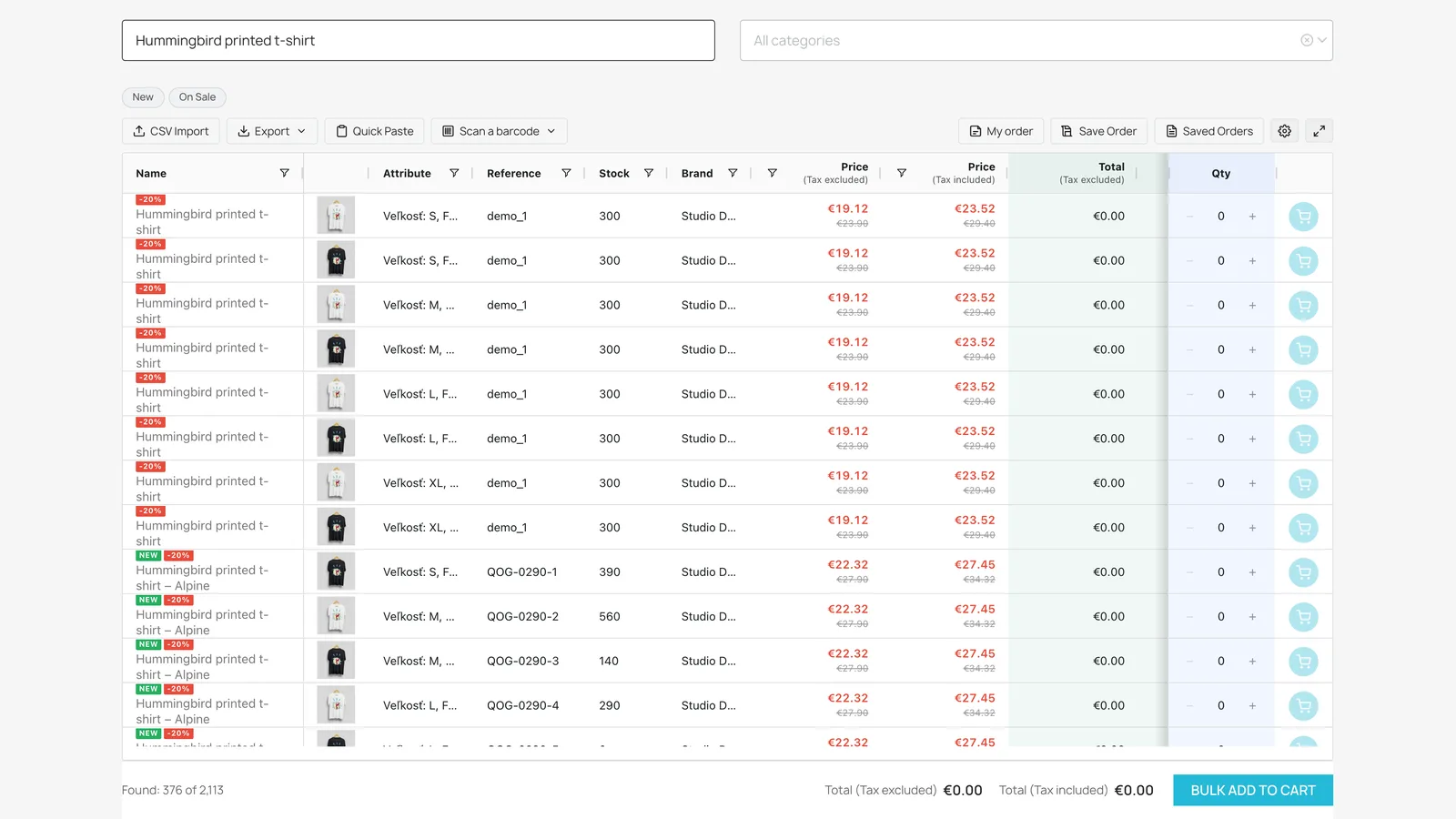
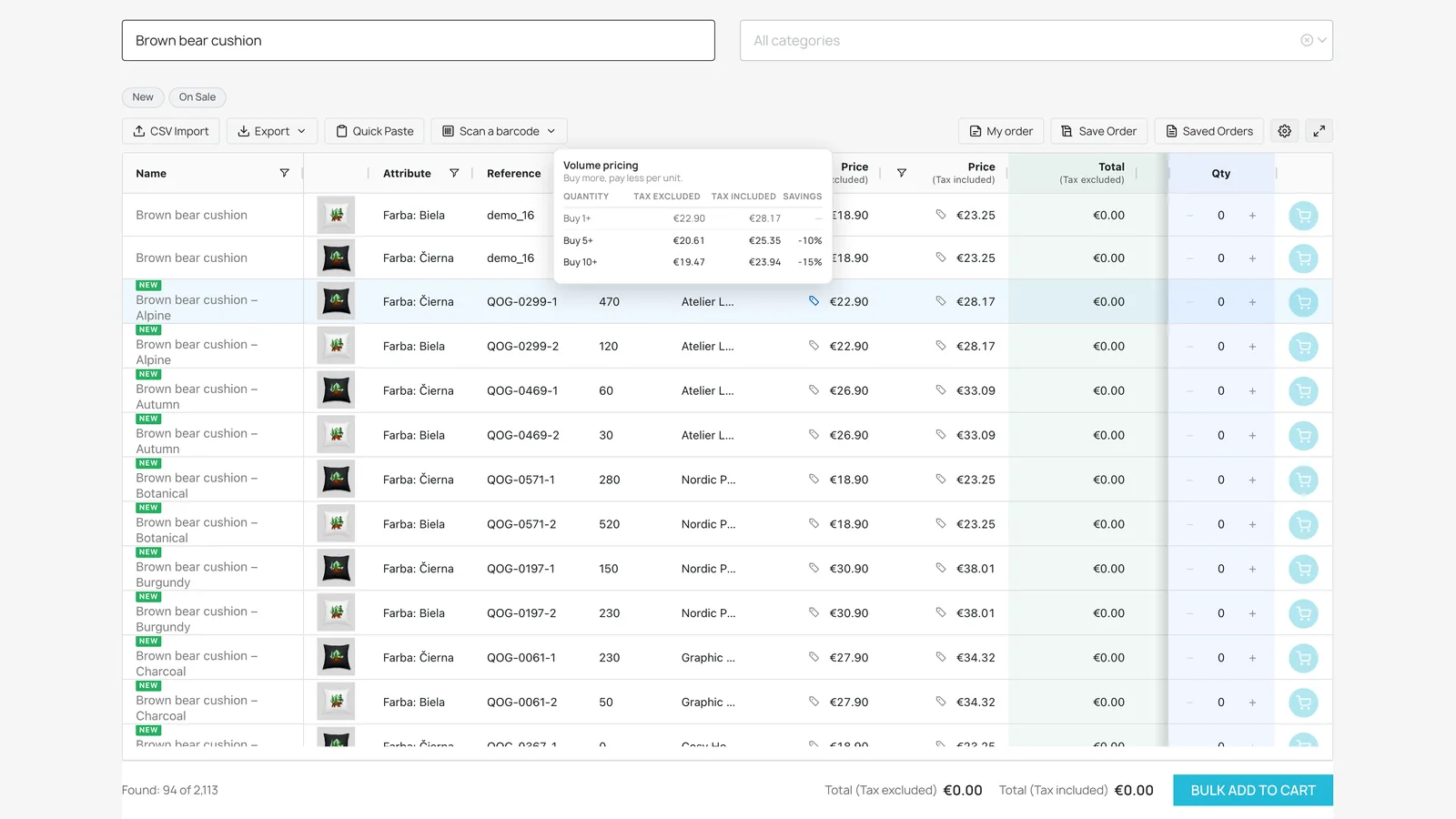
A t-shirt in four sizes and two colours is eight rows in the grid, each with its own attributes, stock and price, and its own reference when the combination has one. Buyers type a quantity in each row instead of opening the product page eight times.
Imports work the same way. A CSV or a pasted list is matched by reference, EAN-13, MPN, UPC, ISBN or supplier reference, at combination level first, so a combination with its own reference lands on the right size and colour.
Out-of-stock combinations can stay visible, be greyed out or be hidden, per combination. The module also works with the "Enable / Disable a Combination, Import .csv" module: disabled combinations are hidden or greyed out.
Prices the way your cart will charge them
Products with quantity discounts show a tag next to the price. Hovering or tapping it opens the tiers, with the active one highlighted. Row totals, order totals and exports use the tier the order reaches, so they match the cart.
Access is set per customer group in three levels: who may browse the catalogue, who may see prices and who may order. Every request is checked on the server, including the cart.
In PrestaShop catalogue mode with prices shown, the grid becomes a read-only price list. Prices, rounding and the "tax excluded / included" wording follow your shop settings.
Built for the weekly reorder
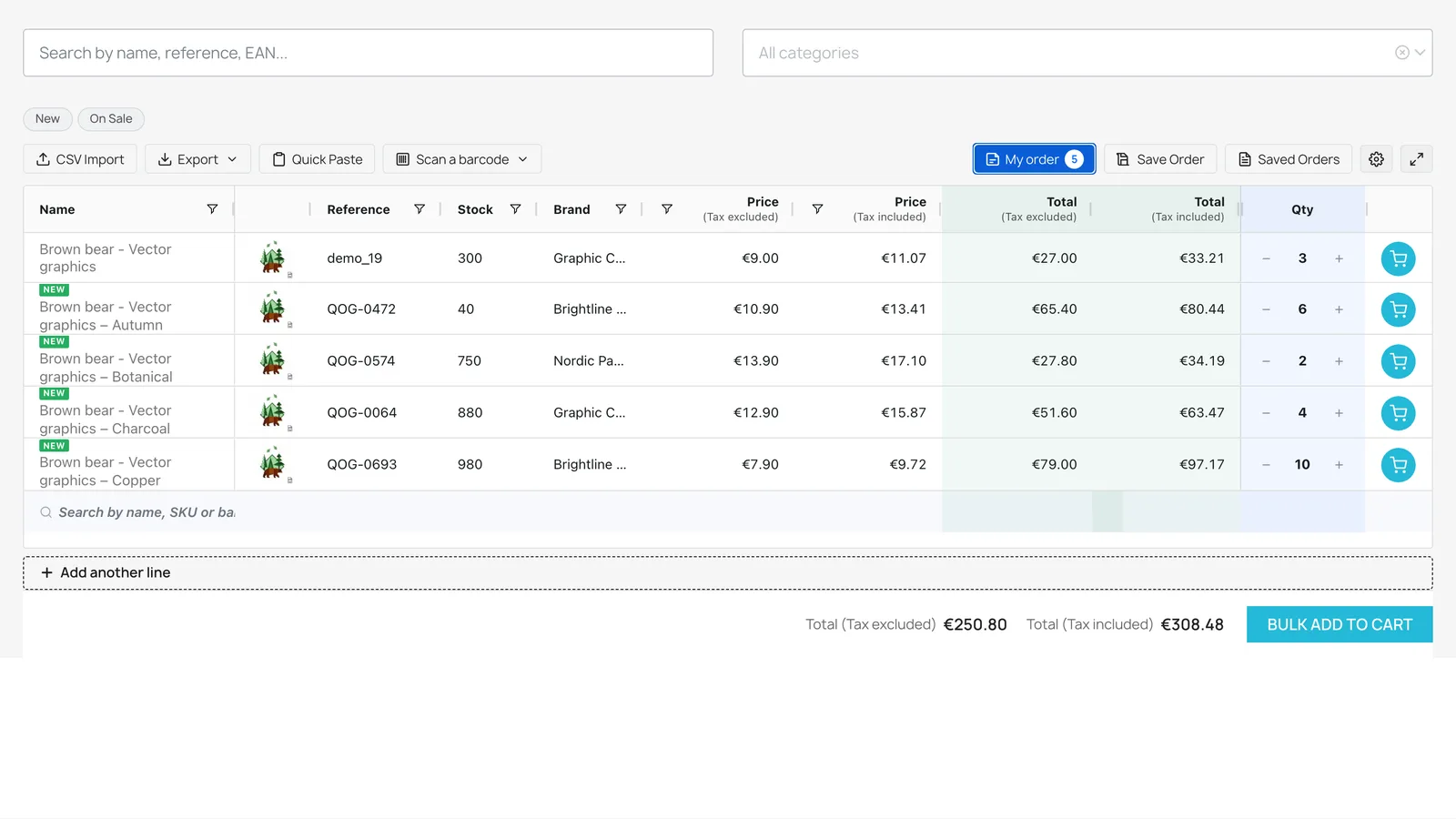
Buyers save an order as a named template and load it again next time. Templates of logged-in customers are stored on the server (up to 50 each by default). Guests keep theirs in the browser, and after creating an account they still see them next to the saved ones.
The My order view lists only the lines with a quantity, and Add another line lets a buyer add a product by name, reference or barcode without going back to the catalog.
The order can be exported as CSV, Excel (XLSX) with formulas, a white-label PDF for approval, or XML for another system.
The details a B2B store needs
Bulk add to cart
Every row with a quantity goes to the cart in one request. Stock and minimum quantities are checked, and refused lines stay in the grid with the reason.
Customer groups
Open the page to all visitors, logged-in customers only, or selected customer groups.
Grid configurator
Arrange, resize, pin and hide columns in the back office with a live preview. Buyers can filter by brand.
Large catalogs
Catalogs under 3,000 rows load at once. Larger ones switch to server-side loading with infinite scroll.
Product links and images
Choose whether names link to the product page and whether an image click zooms, opens the product or does nothing.
15 languages
The module is available in 15 languages, including English, French, German, Spanish, Italian and Polish.
Will it work with my store?
- PrestaShop versions
- 1.7.0 to 9.1
- Multishop
- Yes, with settings and saved orders per shop
- Overrides
- None. The module does not override PrestaShop core classes.
- Themes
- Hummingbird, Classic or a custom theme. Plain JavaScript, no jQuery.
- Large catalogs
- Above 3,000 rows the grid loads from the server with infinite scroll
- Server
- PHP 7.2 or later, MySQL 5.6 or later. The PHP zip extension for XLSX export, HTTPS for camera scanning.
- Other modules
- Compatible with "Enable / Disable a Combination, Import .csv"
- Languages
- 15 languages
What it does not do
- It does not let staff or sales reps place orders on behalf of customers.
- Checkout is unchanged. The grid fills the standard PrestaShop cart and customers check out as usual.
- PrestaShop core has no maximum or step quantity, so the grid cannot enforce one. It does respect each product's minimum quantity.
- The camera scanner does not read QR codes or Data Matrix.
What merchants say
Listed as B2B Quick Order Grid on PrestaShop Addons, rated 5 out of 5 in both verified reviews so far.
"Good product, very responsive support for any questions. Perfect"
"Perfect module, it's very powerful, and the dev added some features really quick! You can go for it!"
Live on your PrestaShop store in three steps
No code and no theme changes. The Quick order page gets its own friendly URL that you can change in SEO & URLs.
Install
Buy the module on PrestaShop Addons, then upload the ZIP in Modules > Module Manager. It registers its hooks and creates its tables by itself.
Set it up
Choose who can open the page, arrange the columns in the grid configurator and switch on the features your buyers need.
Share the link
The Quick order link appears in the top bar and in My account. Add it to your menu too, so buyers find it on every device.
Step-by-step guide: PrestaShop documentation
Questions about the PrestaShop quick order module
Yes. It works with Hummingbird, Classic and custom themes. The module is written in plain JavaScript with no jQuery dependency and installs without overrides. The Quick order page is linked from the top bar and from My account.
Every combination is its own row, with its attributes, reference, EAN-13, stock and price. Out-of-stock combinations can be shown normally, greyed out or hidden, per combination.
Reference, EAN-13, MPN, UPC, ISBN, supplier reference or product name, matched at combination level first. A file can hold up to 5,000 rows. The separator is detected automatically and column headers are recognised in 15 languages. MPN needs PrestaShop 1.7.7 or later.
Yes. The page can be open to all visitors, to logged-in customers only, or to selected customer groups. Access is checked on the server in three levels: who may browse, who may see prices and who may order. Prices follow the group's own "show prices" setting.
The module itself is not: 83.99 euros (excl. tax) buys a lifetime licence for one store. Support and updates come with PrestaShop's Business Care subscription, which you get with the purchase. The first year is included, then it renews automatically at 2 euros a month, billed annually, unless you switch off the renewal in your PrestaShop Marketplace account. There is no commitment.
Yes. The module is multishop compatible, with its configuration and customers' saved orders kept per shop.
PrestaShop guides
Install and configure the module
Upload, the configuration tabs and checking that the Quick order page works.
Read the docsCSV import on PrestaShop
File limits, column mapping and how rows are matched to products and combinations.
Read the docsB2B ordering best practices
What wholesale buyers expect from an online store and how to give it to them.
Read guideHow to speed up wholesale ordering
Five practical ways to cut the time a repeat B2B order takes.
Read guideGive your PrestaShop B2B buyers a faster way to order
€83.99 one-time (excl. tax), with the first year of support and updates included.